Best AI PDF Tools in 2026: Read, Summarize, Chat, and Edit Documents Faster

The popularity of PDF files
Scientific papers, business papers, user guides, invoices, ebooks, contracts, and resumes are usually distributed as PDF files.
Not all pages can be read at once.
That's where AI PDF tools come into play.
Instead of going through thousands of pages manually, it becomes possible to upload a document, ask questions, make summaries, find key parts, and understand complicated data much faster.
For those who have already checked our guide on using AI for research, it is obvious that finding information is not the main point. It is essential to digest it quickly.
Here, we will compare the best AI PDF tools you should try in 2026.
Why You Should Use an AI PDF Tool
Traditional PDF viewers allow opening documents.
AI PDF tools make it possible to understand them.
Rather than looking for something on every single page, one can just ask questions related to the contents of the document and receive proper answers based on them.
The main advantages include:
- Summary generation
- Question and answer mechanism
- Key insight generation
- Document comparison
- Citation generation
- Multi-document analysis
- Fast reading
These functions can save many hours each week for students, researchers, lawyers, and other professionals.
Quick Comparison
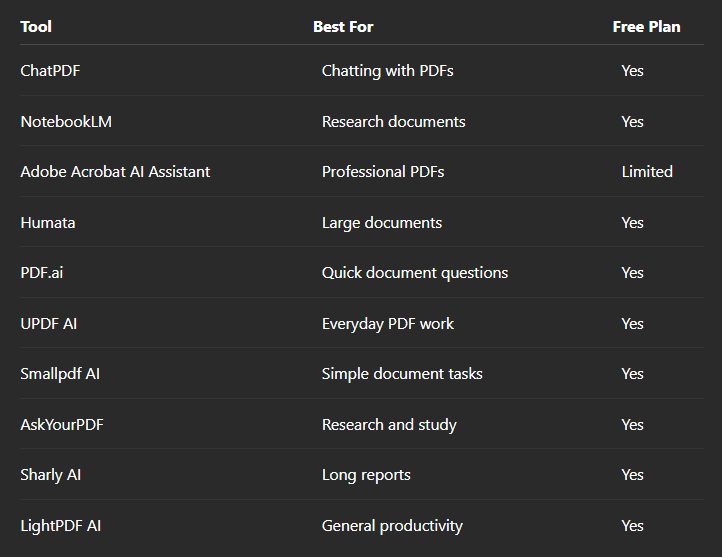
1. ChatPDF
ChatPDF sticks to a single point.
Upload your PDF and start asking questions.
There's no need to search; you can request summaries, clarifications, and even specific information from the document.
Good for
- Students
- Reports
- Research papers
- User manuals
2. NotebookLM
NotebookLM creates a personalized knowledge base out of your documents.
It answers your questions based not on Google but on sources you upload.
Therefore, it will be extremely useful for learning, researching, and other document-related projects.
Good for
- Research
- Studying
- Project documentation
3. Adobe Acrobat AI Assistant
Adobe has integrated AI capabilities directly into its software – Acrobat.
This allows you to summarize, answer questions about, and navigate through PDFs directly within the app.
If you use Adobe every day, this tool should suit you perfectly.
4. Humata
Humata was made for analyzing long technical documents.
By asking questions, you can save hours of time which you would have spent looking for relevant information in a report.
5. PDF.ai
PDF.ai keeps it simple.
Upload the file and start chatting right away.
Easy-to-use interface makes it accessible for everyone.
6. UPDF AI
UPDF combines classic PDF editing with additional AI-powered tools.
Summarize the text, translate content, edit documents and ask questions without changing apps.
7. Smallpdf AI
Smallpdf is already popular because of its PDF conversion and editing abilities.
Now it can help you summarize and analyze documents even faster.
8. AskYourPDF
AskYourPDF was built for document chats.
It will be especially convenient for students and researchers who work with long documents on regular basis.
9. Sharly AI
Sharly AI is specialized in dealing with lengthy documents.
It allows you to get the hang of the main idea, generate summaries and answer detailed questions regarding the document.
10. LightPDF AI
LightPDF combines AI features with classic PDF functions including editing, conversion, file organization etc.
It will be handy for productivity in general.
Which AI PDF Tool Should You Choose?
It depends on your working style.
If you need quick document conversation, ChatPDF is your go-to option.
Scientists and students might benefit more from NotebookLM because of its ability to create answers based on uploaded sources.
If you use Adobe Acrobat on a regular basis, Adobe AI Assistant will feel familiar to you.
For all-round PDF editing, UPDF AI could be a better choice.
Forget about the amount of features the tool has and pick the one that fits your routine better.
Can AI Understand Every PDF?
With most text-based PDFs, there shouldn't be any problems.
Scanned, hand-written, and badly formatted PDFs might cause difficulties.
Quality of the document often influences quality of the answers.
If you want to achieve the best results, it's always better to upload searchable PDFs.
Final Thoughts
Reading long documents doesn't have to be slow anymore.
AI PDF tools can help you spend less time looking for information and more time analyzing it.
No matter if you are researching, studying, preparing for exams, writing business reports or just reading technical documents, AI PDF tools can greatly decrease time needed to find relevant information.
As artificial intelligence keeps improving, document analysis becomes one of the most practical applications of AI in everyday life.


