Best AI Email Assistants in 2026: 10 Tools to Write, Organize, and Reply Faster

Email is one of the most popular forms of communication nowadays.
Whether it's dealing with clients, applying for a new position, working with your team, following up on meetings – chances are high that your day begins with your inbox flooded with messages.
The problem isn't writing emails but processing them.
Scrolling through endless threads of discussion, answering repetitive questions and sorting hundreds of messages is quite challenging.
This is where AI-powered email assistants come in handy.
From summarizing conversations to drafting replies, improving your writing, sorting your inbox or reminding you to follow up – there are many reasons why an AI-powered email assistant could help you in the process.
If you have already checked out our comparison of AI productivity tools, you've probably found out how AI gets rid of repetitive tasks. Email assistants are one of the best examples.
In this article, we'll compare some of the best AI email assistants worth trying in 2026.
Why Should You Use an AI Email Assistant?
AI won't replace your email.
But it will definitely make managing it easier.
Instead of spending several minutes on each reply, you get a draft that needs to be reviewed and personalized.
Some of the biggest benefits include:
- Drafting email replies
- Summarizing long conversations
- Improving grammatical and tonal accuracy
- Sorting your inbox
- Translating emails
- Creating follow-up messages
- Finding the necessary information quickly
The result is less time spent on your inbox and more time dedicated to your actual work.
This might be helpful : How to Write Better AI Prompts
Comparison
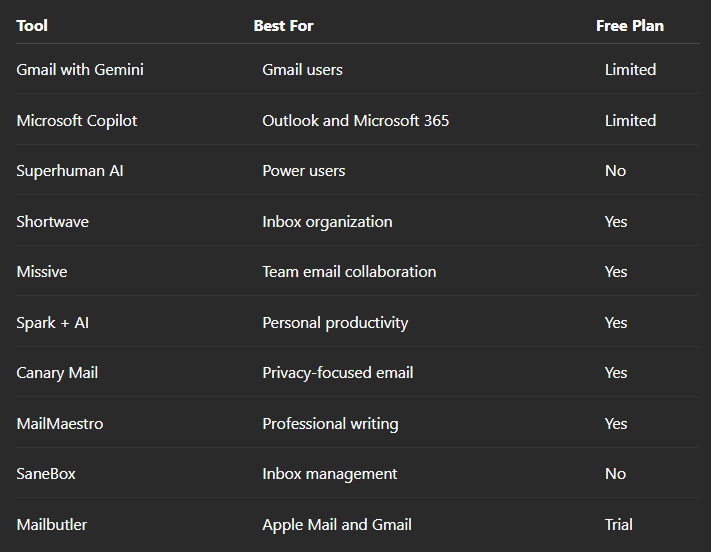
1. Gmail with Gemini
Gemini adds AI capabilities to Gmail.
It can summarize conversations, draft responses, rewrite messages and assist users in finding the information without digging through their inbox.
Best for:
- Gmail users
- Everyday communication
- Personal productivity
2. Microsoft Copilot
Copilot is integrated with Outlook and Microsoft 365.
It summarizes conversations, drafts emails and assists users in prioritizing messages.
If your business is already operating with Microsoft ecosystem, it will feel quite natural.
3. Superhuman AI
Superhuman is created for people who spend most of their days working with email.
AI capabilities assist them in writing replies, summarizing conversations and processing email much faster than usual.
4. Shortwave
Shortwave transforms the experience of working with Gmail.
It groups conversations, summarizes threads and makes the whole process of working with email closer to messenging apps.
One of the biggest reasons why many people choose it is that it greatly reduces the amount of clutter in their inbox.
5. Missive
Missive is an email client combined with a team collaboration solution.
Instead of sending messages internally, teams can discuss them before replying.
It makes this tool quite helpful for customer support and shared inboxes.
6. Spark + AI
Spark is an email client with AI writing assistance and smart inbox features.
It helps users rewrite emails, improve tone and create professional replies in seconds.
7. Canary Mail
Canary Mail is a privacy-focused email solution with some AI features.
It summarizes emails, drafts replies and makes security the core of its interface.
8. MailMaestro
MailMaestro is developed for professionals writing emails daily.
It can generate replies, adjust tone and make your messages shorter.
9. SaneBox
SaneBox sorts your inbox using AI.
Instead of creating new email content, it organizes less relevant messages automatically.
10. Mailbutler
Mailbutler adds productivity features to your existing email client.
It allows users to use AI writing assistance, track emails, schedule them and use reminders.
Which AI Email Assistant Should You Use?
It all depends on the way you use your email.
If you're already working within Gmail, then Gmail with Gemini would suit you the best.
Outlook users would definitely benefit from Microsoft Copilot.
Those who spend several hours daily managing emails will find Superhuman more helpful.
Shared inbox teams will prefer Missive as their tool.
Instead of selecting the tool with the largest number of features, pick the one that matches your existing workflow.
Will AI Replace Email?
Not really.
Email will remain one of the simplest forms of communication between businesses, organizations and schools.
AI won't replace email.
It'll get rid of repetitive tasks surrounding it.
From writing first drafts to organizing conversations and summarizing threads – this is exactly what AI does best.
Conclusion
Email isn't going anywhere anytime soon.
While your inbox is growing, AI assistants become an important productivity tool.
They allow you to respond faster, stay organized and spend less time on managing your inbox.
The best thing about this is that most of these tools work alongside your email service and don't require you to change the way you communicate.


