Best AI Note-Taking Apps in 2026: 10 Smart Tools for Organizing Your Ideas

Best AI Note-Taking Apps in 2026
Great ideas never come from your desk.
They pop up in meetings, articles, podcasts, or even walks outside.
Taking those ideas down is quite easy.
Looking for them afterwards becomes more difficult.
This is where AI-based notetakers come into play.
Instead of being just another kind of digital notebook, AI notetaking software helps you organize notes, summarizes long pieces, answers your questions about your own data, and even connects related information.
If you have already checked out our list of AI productivity tools, you have probably noticed how quickly AI-based notetaking becomes one of the most efficient ways to save your time daily.
Here is the list of the best AI note taking apps you may need in 2026.
If you're also exploring AI assistants, check out our guide to the Best ChatGPT Alternatives in 2026.
Why Use an AI Note-Taking App?
Traditional notetaking apps are designed to keep your data.
But AI note-taking apps help to use that data.
You will no longer need to find the necessary information on dozens of pages; all you need is to ask a question and get the necessary answers from your notes in a plain language.
Here are some major advantages of AI notetaking apps:
- Automated summaries
- AI-based search
- Meeting notes
- Smart organization
- Knowledge management
- Document analysis
- Fast information access
The more notes you keep, the more benefits you get from using these features.
Comparison of the Best AI Note-Taking Tools
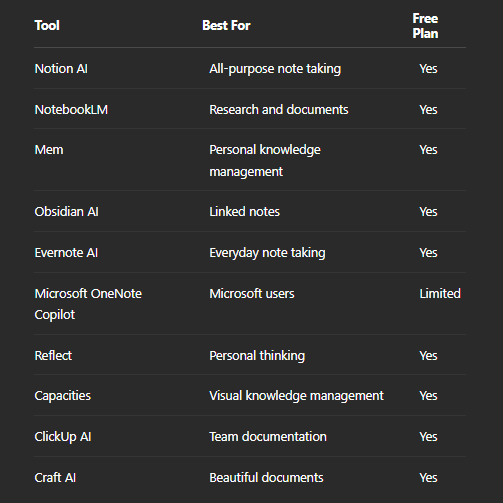
1. Notion AI
Notion AI integrates notetaking, document creation, database management, and AI-powered writing in a single workspace.
This tool helps to summarize meeting notes, generate action points, rewrite texts, and answer questions based on your existing pages.
Best for
- Personal knowledge bases
- Teams
- Documentation of projects
- Productivity
2. NotebookLM
This notetaking app uses an unusual way of processing data.
It doesn't search for answers to your questions in the Internet but searches for them among your documents.
You may upload PDFs, research papers, and notes, and then ask questions based on those sources.
This notetaking app suits perfectly for students and researchers.
If your work involves academic papers or reports, learning How to Use AI for Research can help you get even better results.
Best for
- Research
- Learning
- Analyzing long documents
3. Mem
This application is focused on helping you memorize information in a natural way.
Instead of forcing you to organize notes in different folders, it helps you to connect notes automatically.
As a result, your notes become easier to search and reuse.
4. Obsidian AI
If you already use Obsidian because of its popularity among users who create a big knowledge base, you can try its version with AI.
Graphical view and linked notes become helpful to connect ideas through hundreds or even thousands of notes.
5. Evernote AI
This application is not only a notetaking app.
Now it includes a set of AI-powered features which allow summarizing notes, improving writing, and finding the necessary information quicker.
6. Microsoft OneNote Copilot
If you already use Microsoft 365 suite of applications, you can easily integrate this notetaking app into your workflow.
With its help you can summarize your notebooks, organize notes taken during the meetings, and generate new content based on your existing information.
7. Reflect
This tool is focused on your personal thoughts.
Journals, ideas, reading and meeting notes all become connected in a single workspace.
This allows reviewing information easily.
8. Capacities
This notetaking app organizes knowledge in relation to objects instead of using folders.
It provides flexible connections between notes and allows exploring complex information.
9. ClickUp AI
This application combines task management and documentation.
It uses AI for summarizing discussions, generating project update notes, and organizing team knowledge.
10. Craft AI
This tool is well-known by its great writing experience.
Its AI-based features help to improve documents, summarize content, and create high-quality notes.
Which AI Note-Taking Tool Do You Need?
It is quite difficult to define the best notetaking app for you.
If you are looking for a single workspace for almost all purposes, Notion AI will be the right choice.
If you are a student or researcher, you will definitely like NotebookLM because it works with uploaded documents.
Users who create a long-term knowledge base may consider using Obsidian or Mem.
If you work in a business team, you may try ClickUp AI or Microsoft OneNote Copilot.
Instead of searching for the best notetaking app, choose the right one for your daily workflow.
Can AI Replace Your Notes?
No, it can't.
It becomes helpful only when you have captured good information.
It can organize, summarize, and explain it to you.
The quality of the results also depends on the instructions you give it. Learning How to Write Better AI Prompts can help you get much better summaries and answers.
But it can't substitute your observations, experiences, and ideas.
The best result you can achieve when combining thoughtful notetaking with AI assistance.
Final Thoughts
The amount of information we consume increases every year.
Combining note-taking with efficient AI Workflows can save even more time every day.
Tracking this information without any system becomes more difficult.
Notetaking AI applications help to transform disorganized information into structured knowledge.
And instead of spending lots of time searching your old notes, you can devote more time to learning, creating, and making good decisions.


