Best AI Coding Tools in 2026 – Write Code Faster, Easier, Smarter

With the advent of artificial intelligence technology, the approach to coding has also changed. Things that used to take hours can be accomplished in minutes. Be it code generation, bug fixes, code explanation, or documentation writing, AI coding tools are now irreplaceable components of the coding process.
Be you a programmer who's learning their first coding language or a professional who develops complex applications, there is always some AI coding assistant to help you save time.
This article describes the best AI coding tools for 2026, their pros, and ways to choose the right one for you.
Why to Use AI Coding Tools?
The benefits of AI coding assistants include:
- Generating code based on simple prompts
- Explaining the code
- Fixing bugs and other coding issues
- Refactoring messy code
- Creating tests
- Writing code documentation
- Accelerating repetitive tasks
AI tools don't replace developers but act like a skilled programming assistant always ready to help.
1. GitHub Copilot
Best for: Everyday coding
GitHub Copilot is still one of the most popular AI coding assistants. It is integrated with such editors as VS Code, JetBrains IDEs, and Neovim.
Key Features
- Intelligent code suggestions
- Generation of whole functions
- Support for dozens of programming languages
- Tests generation
- Code explanation
- Code improvement suggestions
Pros
- Excellent integration with the editor
- Reliable and quick suggestions
- Ideal for regular development
Cons
- Premium subscription needed
- Suggestions still require manual review
2. ChatGPT
Best for: Debugging, studying, solving coding problems
ChatGPT is not only a chatbot but also an assistant that will explain you concepts, generate code, optimize algorithms, and debug.
Key Features
- Code generation from natural language description
- Explanation of programming concepts
- Debugging of complex issues
- Translation of code into other languages
- Generation of SQL queries
- Writing documentation
Pros
- Excellent explanations
- Works with almost every programming language
- Ideal for beginners and professionals
Cons
- Needs a clear prompt for optimal results
3. Claude
Best for: Working with large codebases
Claude is particularly helpful in case of long files or big projects due to large context window.
Key Features
- Understanding of large codebases
- Clean code generation
- Pull request review
- Refactoring of existing code
- Code architecture explanation
Pros
- Excellent reasoning abilities
- Works well with long conversations
- Excellent for review of complex projects
Cons
- Availability varies depending on the location and plan chosen
4. Cursor
Best for: AI-based coding experience
Cursor is a unique AI-first code editor and not a plugin for the traditional editor.
Key Features
- AI chat inside the editor
- Editing of multiple files
- Understanding of the whole project
- Automatic refactoring
- Smart debugging
Pros
- Extremely efficient workflow
- Deep understanding of the project
- Excellent developer experience
Cons
- Requires adaptation if coming from traditional editors
5. Windsurf
Best for: AI-assisted software engineering
Windsurf focuses on developing complete applications.
Key Features
- Multi-file editing
- Code generation
- Project understanding
- Refactoring
- Debug assistance
Pros
- Great automation
- Useful for medium and large projects
Cons
- The most useful features are available only with paid plans
6. Replit AI
Best for: Beginners and coding online
Replit AI enables developers to code, run, and deploy their code from the browser.
Key Features
- Browser-based IDE
- AI code generation
- Instant deployment
- Support for many languages
- Collaboration tools
Pros
- No setup required
- Perfect for beginners
- Easy collaboration
Cons
- Less powerful than desktop IDE for very large projects
7. Amazon Q Developer
Best for: Developers who work on AWS
Amazon Q Developer is tailored for teams developing applications on AWS.
Key Features
- AWS code suggestions
- Cloud troubleshooting
- Guidance on infrastructure
- Security recommendations
Pros
- Excellent AWS integration
- Reduces cloud development time
Cons
-
Less useful for non-AWS development
How to Choose the Right AI Coding Tool?
Select according to your coding workflow.
If you are a beginner
Use ChatGPT together with Replit AI to study programming concepts while writing code.
If you are a professional developer
GitHub Copilot or Cursor will accelerate your everyday coding tasks significantly.
If you develop large codebases
Claude or Cursor will give you better understanding of complex projects.
If you develop cloud applications
Amazon Q Developer is the best solution for AWS development.
Tips to Get Better Results from AI Coding Tools
Even the best AI coding assistants depend on your prompt quality.
Try to:
- Explain your goal clearly
- Mention the programming language
- Provide error messages
- Share the code
- Ask for explanations, not only for code
- Review generated code before using it
The better prompt you provide, the better will be the response from AI.
Are AI Coding Tools Worth It?
For most developers, the answer is positive.
AI coding tools reduce repetitive work, accelerate development, and help to solve the problem faster. However, AI is only meant to assist your coding process but not replace your understanding of programming fundamentals.
The best developers use AI tools for productivity while still reviewing all suggestions and making the decisions.
FAQ
Which AI coding assistant is the best?
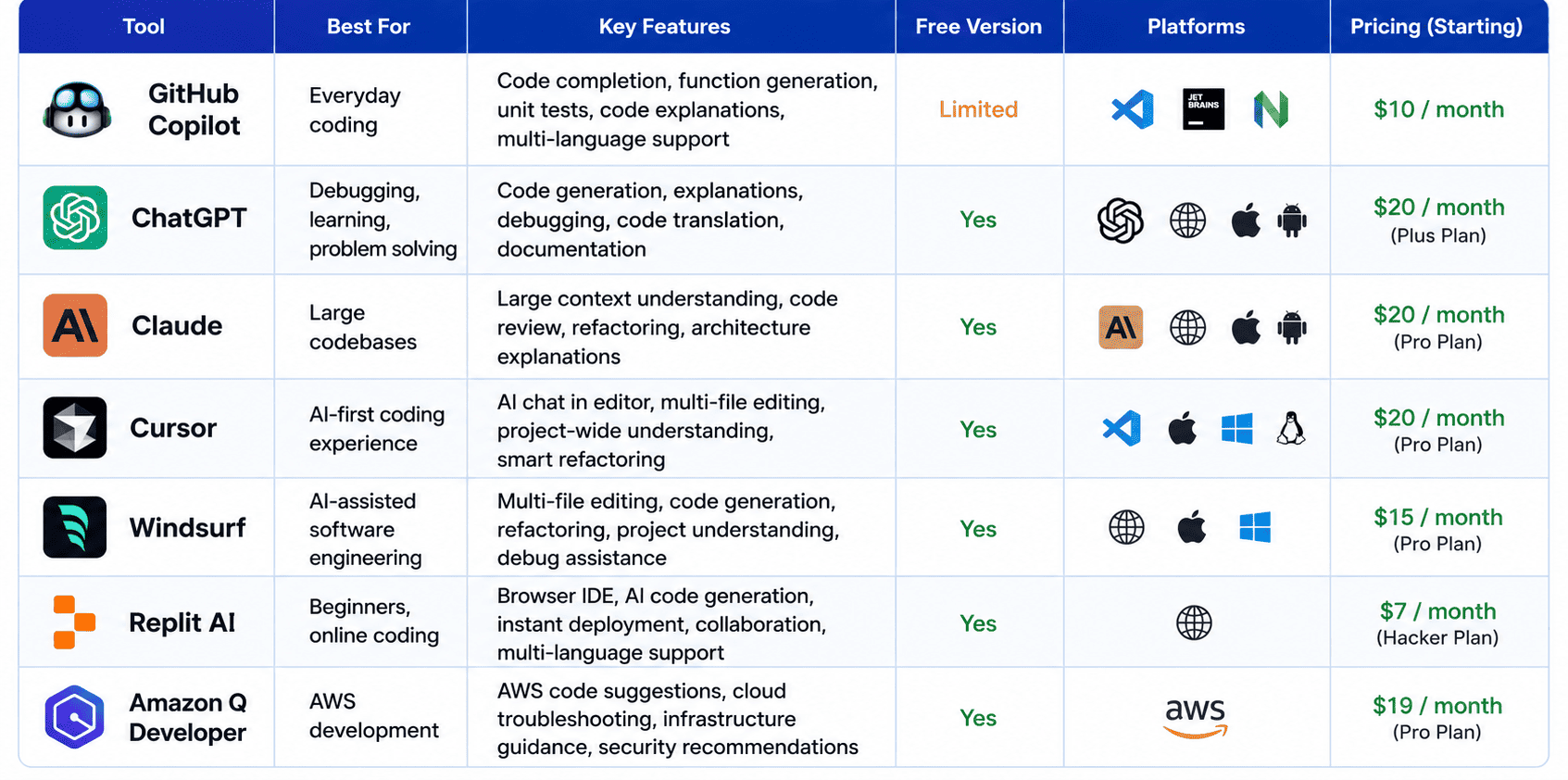
GitHub Copilot is one of the best tools for everyday coding, while ChatGPT is great for debugging, learning, and code explanation.
Can beginners use AI coding tools?
Yes, AI tools can explain concepts, generate examples, and help new programmers learn faster.
Are AI coding assistants free?
Most of the tools offer free versions, however, some advanced features require a paid subscription.
Can AI coding assistants replace software developers?
No, AI helps to increase productivity but still requires a human for problem solving, architecture, testing, and making decisions.
Final Words
AI coding assistants have become a necessary part of software development process. No matter whether you develop websites, mobile applications, APIs, or machine learning models, these assistants will help you to work faster and avoid mistakes.
Try one of these assistants, find out how to formulate your prompt properly, and use AI to automate repetitive work while focusing on solving the problems.


